

Apple has announced Apple Creator Studio, a new subscription that brings together its most powerful creative apps and fresh AI features in one bundle. The idea is simple: give anyone—from full‑time professionals to students and hobbyists—access to studio‑level tools on Mac, iPad and iPhone, without having to buy each app separately.
- What’s included in the Apple Creator Studio subscription
- Smarter, faster video creation with Final Cut Pro, Motion and Compressor
- Taking music creation to the next level with Logic Pro and MainStage
- Creative imaging designed for iPad with Pixelmator Pro
- Supercharging visual productivity with Keynote, Pages, Numbers and Freeform
- Pricing, availability and device compatibility
With Apple Creator Studio, creators get a curated set of apps for:
- Video editing
- Music production
- Creative imaging
- Visual productivity and presentations
It builds on the central role that Apple devices already play in modern content creation, and layers in new intelligent features and premium content while keeping user privacy in mind.
The subscription includes:
- Final Cut Pro for Mac and iPad
- Logic Pro for Mac and iPad
- Pixelmator Pro for Mac and (for the first time) iPad
- Motion, Compressor, and MainStage for Mac
- New AI features and premium content for Keynote, Pages, Numbers, and later Freeform
Apple Creator Studio launches on the App Store on Wednesday, January 28 for $12.99 per month or $129 per year, with a one‑month free trial. College students and educators can get it at a heavily discounted price.
What’s included in the Apple Creator Studio subscription
An Apple Creator Studio subscription gives you:
- Final Cut Pro (Mac + iPad)
- Logic Pro (Mac + iPad)
- Pixelmator Pro (Mac + iPad)
- Motion, Compressor, MainStage (Mac)
- Intelligent new features and premium content in Keynote, Pages, Numbers, and later Freeform (iPhone, iPad, Mac)
Subscribers get the same professional engines and workflows these apps are known for, now enhanced with AI‑powered tools that speed up editing, organising, and content creation.
If you prefer to own apps outright, Apple still offers one‑time purchases on the Mac App Store for:
- Final Cut Pro
- Logic Pro
- Pixelmator Pro
- Motion
- Compressor
- MainStage
These can be bought individually without subscribing to Apple Creator Studio.
Smarter, faster video creation with Final Cut Pro, Motion and Compressor
Final Cut Pro for Mac and iPad is at the heart of Apple Creator Studio’s video offering. On modern Macs with Apple silicon, as well as supported iPads, Final Cut Pro delivers high performance even for complex, high‑resolution projects. New intelligent features are designed to help editors move from rough footage to polished edit much faster.
Key new capabilities include:
- Transcript Search (Mac + iPad)
Instead of scrubbing manually through hours of clips, you can type a phrase into a search bar and instantly find relevant soundbites. This is especially helpful for video podcasts, interviews, and documentary work, where finding a specific quote can otherwise take a long time. - Visual Search (Mac + iPad)
Need a shot of a specific object or action? Visual Search lets you search visually across your media. You can quickly identify moments based on what’s actually in the frame and drop those clips straight onto your timeline. - Beat Detection (Mac + iPad)
Editing to music becomes far easier. Beat Detection uses AI technology from Logic Pro to analyse a music track and display a Beat Grid right in the timeline. You can see beats, bars, and song sections visually, then time your cuts to the rhythm or reshape music to fit your edit more smoothly. - Montage Maker for iPad
On iPad, Montage Maker uses AI to assemble a dynamic video edit in seconds. It scans your footage for the best visual moments, strings them together, and lets you adjust pacing, sync to a music track, and automatically reframe horizontal videos to vertical with Auto Crop—ideal for social media posts.
Apple Creator Studio also unlocks two key companion apps on Mac:
- Motion
A powerful motion graphics app for cinematic 2D and 3D titles and effects. New intelligent tools like Magnetic Mask can automatically isolate and track people or objects in a shot—without needing a green screen—so you can change backgrounds and environments with less manual rotoscoping. - Compressor
This app integrates tightly with Final Cut Pro and Motion, giving you deep control over output formats and settings. It’s designed for creators who need customised exports for different platforms or distribution pipelines.
Together, these apps make Apple Creator Studio a strong end‑to‑end solution for video creators, from YouTubers and social storytellers to filmmakers and editors working on more demanding projects.
Taking music creation to the next level with Logic Pro and MainStage
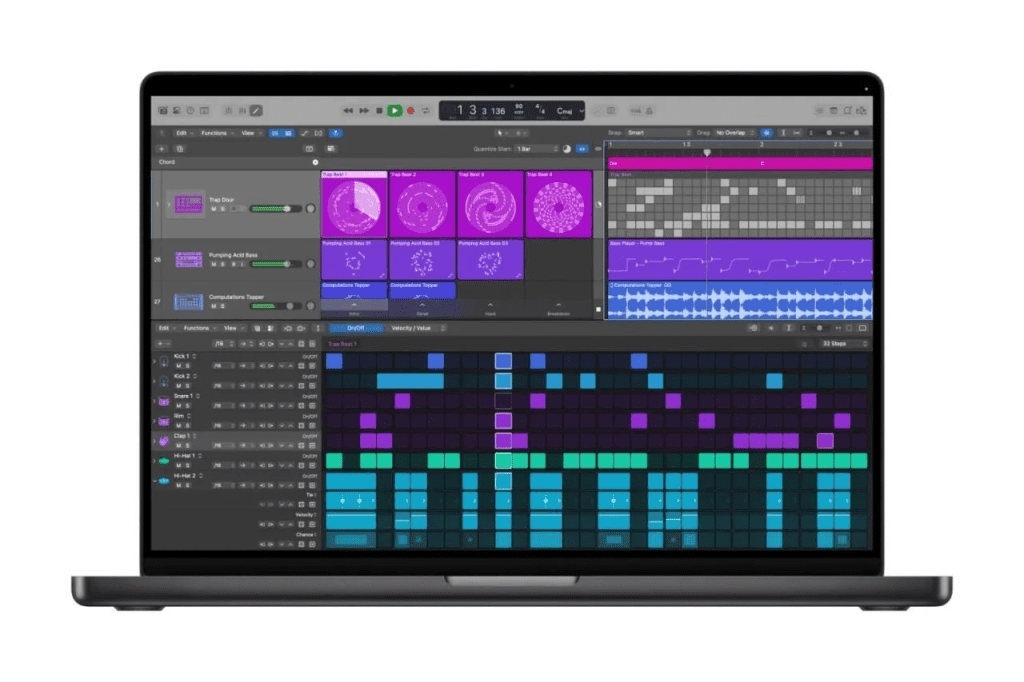
On the audio side, Apple Creator Studio supercharges Logic Pro on Mac and iPad with new AI‑driven features for songwriting, beat making, production, and sound design.
Highlights include:
- Synth Player: a new AI Session Player
Synth Player joins Logic Pro’s AI Session Player lineup, delivering realistic electronic performances with chord parts and synth bass lines. It’s like having a virtual synthesist on call, able to expand on your musical ideas instantly.- Powered by Logic Pro’s extensive software instruments and Apple’s in‑house sound design.
- Easily controlled with intuitive parameters for complexity and intensity.
- Can also drive third‑party Audio Units plug‑ins or even external hardware synths.
- Chord ID: instant chord progression detection
Chord ID acts as your personal music theory assistant. It can:- Analyse audio or MIDI recordings
- Detect the underlying chords
- Automatically turn them into a usable chord progression inside Logic Pro
- New Sound Library and Producer Packs
Logic Pro for Mac adds an expanded Sound Library with Apple‑created packs and Producer Packs, giving you hundreds of royalty‑free:- Loops
- Samples
- Instrument patches
- Drum sounds
- Quick Swipe Comping on iPad
Logic Pro for iPad gains Quick Swipe Comping, a popular feature from the Mac version. It’s a go‑to tool for vocalists and producers who want to combine the best parts of multiple takes into one seamless performance, whether they’re in a studio or recording on the go. - Music Understanding & natural language search
On iPad, Logic Pro introduces Music Understanding features that let you:- Describe the kind of loop you want using plain language
- Search for similar loops based on an existing one or even a recording
Apple Creator Studio also includes MainStage on Mac. MainStage turns your Mac into:
- A live instrument rig
- A vocal processing setup
- A guitar or bass rig
You can bring your Logic Pro sounds on stage, so what you’ve crafted in the studio is exactly what your audience hears. It’s designed to make setup and teardown fast and reliable for live performances.
Creative imaging designed for iPad with Pixelmator Pro
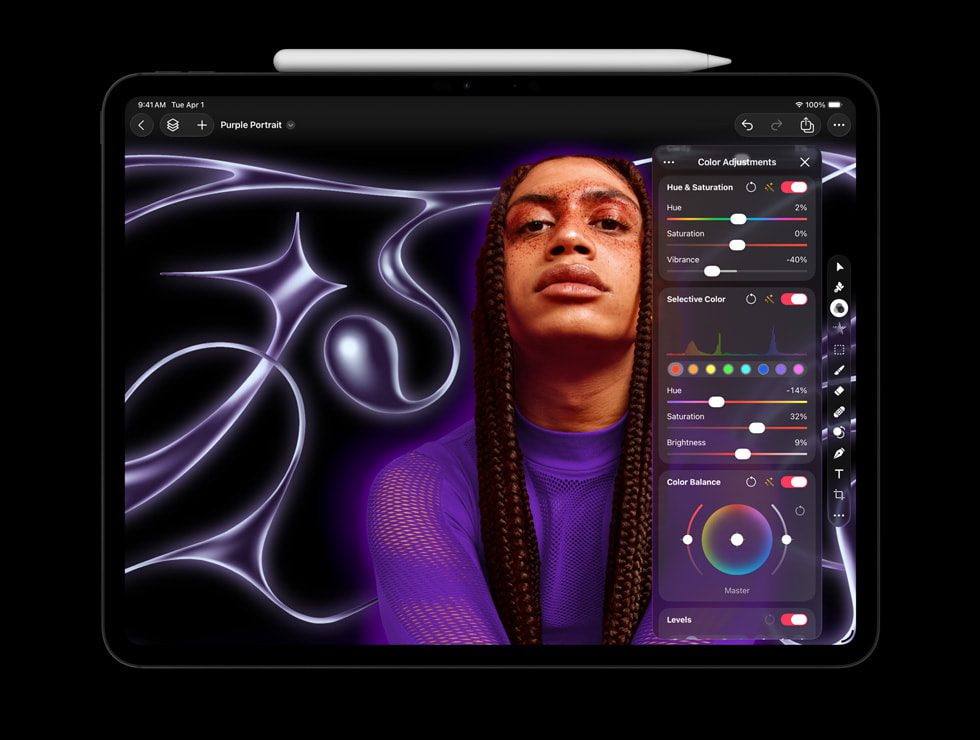
Pixelmator Pro, a well‑known image editor for Mac, is part of Apple Creator Studio and now also arrives on iPad for the first time.
With Apple Creator Studio, both Mac users and subscribers on iPad get a professional yet approachable set of tools for design, illustration, photo editing and compositing.
On iPad, Pixelmator Pro offers:
- A touch‑optimised interface built specifically for iPadOS
- Full Apple Pencil support, including advanced gestures like hover, squeeze, and double‑tap on supported hardware
- A flexible Layers sidebar, so you can build designs from:
- Images
- Shapes
- Text
- Even video elements
Smart tools help you work more precisely:
- Selection tools make it easy to isolate and edit parts of an image.
- Bitmap and vector masks let you reveal or hide specific areas cleanly.
- Tight integration with Apple silicon and iPad hardware enables features like:
- Super Resolution, for intelligently upscaling photos
- Deband, for reducing compression artifacts
- Auto Crop, which suggests strong compositions automatically
For digital artists, the combination of pressure‑sensitive brushes and Apple Pencil precision makes sketching and painting feel natural, while still giving you pixel‑level control.
Apple Creator Studio subscribers also get new capabilities on both Mac and iPad:
- A powerful Warp tool for bending and reshaping layers
- A collection of Warp‑based product mockups, useful for branding, packaging previews and other visual presentations
Supercharging visual productivity with Keynote, Pages, Numbers and Freeform
Apple’s visual productivity apps—Keynote, Pages, Numbers, plus Freeform—have long been used to create presentations, documents, spreadsheets and collaborative boards. Apple Creator Studio builds on this foundation with new intelligence and premium content, particularly for people who create visually rich work.
Key additions include:
- Content Hub
A new central space where subscribers can browse curated, high‑quality photos, graphics and illustrations to use in their projects. This library is tightly integrated into Keynote, Pages and Numbers. - Advanced image creation and editing
Beyond Image Playground, Apple Creator Studio unlocks tools that let you:- Generate images from text prompts
- Transform existing images in creative ways
- Super Resolution, to upscale images while keeping fine detail
- Auto Crop, which offers smart crop suggestions that highlight compelling compositions
- Keynote intelligence features (in beta)
To speed up presentation prep, Creator Studio subscribers can:- Automatically create a first draft of a presentation from a text outline
- Generate presenter notes based on existing slides
- Quickly clean up slide layouts, fixing alignment and object placement with minimal manual adjustments
- Numbers with Magic Fill
In Numbers, new intelligence tools can:- Suggest formulas
- Fill table data automatically based on recognised patterns
Importantly, Keynote, Pages, Numbers and Freeform remain free for all users to create, edit and collaborate, even without an Apple Creator Studio subscription. Apple will continue to update these apps with:
- A refreshed visual design introducing Liquid Glass
- Support for new windowing and menu bar improvements in iPadOS 26
Apple Creator Studio simply adds additional layers of AI‑powered functionality and premium content on top.
Pricing, availability and device compatibility
Launch date and pricing
- Available starting Wednesday, January 28
- $12.99 (U.S.) per month or $129 (U.S.) per year
- Includes a one‑month free trial for new subscribers
With the purchase of a new Mac or eligible iPad from Apple or an Apple Authorized Reseller, qualified buyers can get three months of Apple Creator Studio for free, subject to Apple’s offer terms.
Education pricing
- College students and educators can subscribe for $2.99 (U.S.) per month or $29.99 (U.S.) per year.
- Verification is required, and this special Education Savings Plan does not extend to an entire Family Sharing group.
Availability and sharing
- Apple Creator Studio is offered as a universal App Store purchase.
- Up to six family members can share access via Family Sharing, including all apps and included content.
One‑time purchase prices on Mac App Store
For those who prefer not to subscribe:
- Final Cut Pro: $299.99 (U.S.)
- Logic Pro: $199.99 (U.S.)
- Pixelmator Pro: $49.99 (U.S.)
- Motion: $49.99 (U.S.)
- Compressor: $49.99 (U.S.)
- MainStage: $29.99 (U.S.)
Keynote, Pages, Numbers and Freeform remain free and are included with every new iPhone, Mac and iPad.
Device and OS requirements (high‑level summary)
Apple Creator Studio and its apps require recent Apple hardware and software. In general:
- The latest versions of Final Cut Pro, Logic Pro, Pixelmator Pro, Motion, Compressor and MainStage require current or recent versions of macOS, often with Apple silicon recommended or required for certain features.
- The iPad versions of Final Cut Pro, Logic Pro and Pixelmator Pro require recent iPad models with chips such as A16, A17 Pro or M‑series, and current iPadOS versions.
- Some advanced AI and Apple Intelligence features are only available on devices that support Apple’s latest intelligence capabilities and operating systems.
- Enhanced versions of Keynote, Pages and Numbers require up‑to‑date iOS, iPadOS or macOS, with some intelligent image generation features needing the latest OS releases.
For exact compatibility and feature availability, Apple directs users to official support documentation and the App Store product pages.
